


Divi has always been a kind of tool you actually rely on to build full-scale, design-focused websites. We've been working with Divi since its early versions, and seen how it evolved over time.
However, after the launch of Divi 5, it doesn’t feel like just a new theme version or a new feature announcement. The way pages load, the way edits respond, and how the builder behaves during real work all point to a deeper shift.
While there are already plenty of videos, documentations, and guides explaining the new Divi 5 and how it differs from Divi 4, most of that content focuses on what’s announced, not how it actually plays out in real use.
So, in this blog, instead of repeating documentation or listing features, we’re sharing our hands-on experience with the new Divi 5 to see what it claims to improve versus what it actually changes in our actual workflow.
So, let’s get started.
Quick Overview of Divi Theme and Builder At a Glance
Before going to in depth analysis, here’s a quick overview of our experience with DiVi theme and builder with the latest version of DiVi 5:
| Criteria | Our Verdict |
| Ease of Use | User friendly but not for absolute beginners |
| Inline Visual Editor | Real-time inline editor to create, design, customize in one place |
| Responsive Design | Advanced breakpoint control for desktop, tablet, and mobile |
| Templates & Layouts | 370 total layout packs with 2500+ pre-designed page templates. |
| E‑Commerce Tools | 17 WooCommerce modules, cart & checkout control. |
| Marketing Tools | Built-in email plugin (Bloom) and marketing tool (Monarch), Conversion tool (DiVi lead) |
| Global Design Control | Presets, reusable styles, global variables and DiVi library storage |
| Performance & Speed | Performance: 98% (GTMatrix)Page loading speed: 1.3 s (fully loaded) |
| AI Features | Quick site building, Text, image, and code generation inside builder. |
| Site & Team Management | Site management with Divi Cloud, DiviDash, and team manage with DiVi team and DiVi editor |
| SEO Friendliness | SEO-ready structure with responsive performance that support rankings |
| Support & Community | Extensive documentation, active community, and reliable official support |
| Pricing & Value | Starting from $89/year |
| Our Overall Rating | 4.7 / 5 |
Now, let’s jump into the detailed DiVi review.
What Is Divi? Theme, Builder, and Divi 5 Upgrade
Divi is a WordPress website building platform by Elegant Themes that combines design, layout, and site management into one system. The main reason why DiVi stands out from most other page builders on the market is its dual approach of working as both a full WordPress theme and a standalone visual builder plugin
As a theme, Divi controls your entire site structure from headers, footers, templates, global styles, layouts, and all managed visually. And, as a plugin, the Divi Builder lets you create site pages and use the same visual editing experience on top of any WordPress theme.
Again, with the launch of Divi 5, a lot has changed under the hood. The major update of DiVi 5 mainly focused on performance, speed, and centralized site management.
Performance and speed are the biggest upgrades because of no reliance on shortcodes. Responsive controls are now easier to use, centralized design systems using global variables and tools like Divi Cloud and DiviDash integrate marketing with site building and management.
What really separates Divi from other builders is how deeply everything is connected. Instead of bolting a page builder onto WordPress, Divi now makes WordPress a complete site building system.
Feature Breakdown of DiVi (What’s New in Divi 5.0)
Here’s a complete feature breakdown of Divi 5, and how it improves over previous versions and other page builders in terms of functionality, performance, and ease of use.
All-In One Page Management (Create, Design, Customize)
Divi has always been known for its inline editing to work directly on the page, but, its all-in-one page manager within the visual editor is the most noticeable change of DiVi 5.
You can now create pages, design and make it responsive all within the same page builder without going back to the dashboard each time. When you select a text, image, row, section, module, the editing panel for that particular section will instantly open right there to adjust the settings. You don’t constantly jump between panels and previews.
Divi 5 has 3 dedicated editor sections right on your page:
- The left panel is page settings with layouts (where you can instantly create pages using saved, premade, or AI-generated designs)
- The middle section is the page builder (where you create the page)
- The right section is for customizing every element on the page (content, design, advanced).


If you’ve ever worked with Figma, Divi’s inline system feels similar to it.
In DiVi 5 responsive controls for different screen sizes are in the top panel, so you can instantly check how your content looks as you edit. In Divi 4, we had to use the right responsive panel under design settings.
If we compare Divi editor with other page builders, Elementor relies heavily on sidebar editing, while Beaver Builder is simple but doesn’t offer design and edit panels like Divi.
When working on long pages, marketing sections, or client sites where content changes often, this makes a real difference.
Visual Builder within DiVi Theme or Standalone Plugin for Any WordPress Theme
The best part of DiVi is that the visual builder works both with the native Divi Theme and as a standalone plugin to use it with any WordPress theme.
You can install DiVi as a theme to create your entire site either manually using drag and drop visual builder or using DiVi quick site builder with AI. Simply describe your site niche and purpose, AI will generate all the necessary pages for your site within minutes.
Again, you can also install DiVi builder as a WordPress plugin compatible with all WordPress themes to create site pages from scratch using DiVi page modules or with pre-made page templates. With DiVi 5, you can also use AI to create individual pages rather than whole sites.
You’ll get the same interface and features of page creation, customization both in DiVi theme and builder plugin. The main difference is DiVi theme offers building full site where builder plugin only offers pages. So global variables, custom modules and centralized full site management will be limited with the plugin only.
So, if we go for DiVi theme vs DiVi builder plugin, here’s the quick comparison:
| Feature | Divi Theme | Divi Builder Plugin |
| Works with any theme | ❌ | ✅ |
| Full site building | ✅ | ❌ |
| Page building | ✅ | ✅ |
| Centralized site management | ✅ | ❌ |
If we compare this with Elementor or Seedprod page builders, they only offer theme and builder features to their own ecosystem, where Divi lets you build entire sites or individual pages without theme restrictions.
Advanced Page Navigation System (Layers, Wireframe, Inspector, Variable Manager)
With DiVi advanced navigation system, you structure layouts in wireframe mode, locate and manage elements through Layers, analyze and refine styles using the Inspector, and customize styling with variables.
Divi’s page navigation system has always focused on making complex layouts easy to manage. One of the most impactful workflow upgrades in Divi 5 is the Inspector and the Variable Manager features for full site design management.
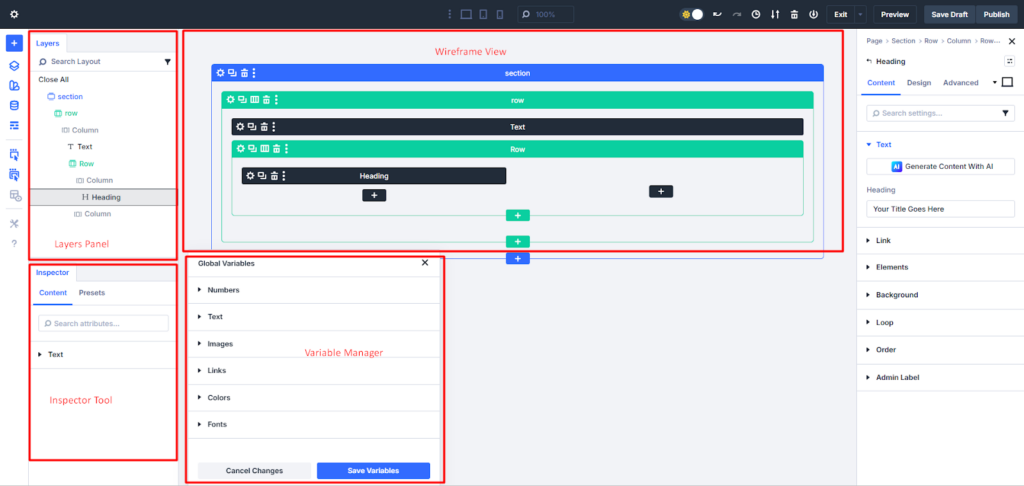

Layers Panel: Complete Layout Overview
The Layers panel shows every section, row, and module on your page in a vertical list. You can see how elements are nested and connected. With layers, you understand the page structure at a glance. You can find any element instantly without clicking randomly on the page. This is very helpful when working on long landing pages, product layouts, or multi-section websites.
Wireframe Mode: Structural Page Blueprint
Wireframe mode displays the basic structure of your page without any design distractions. It shows only the layout blocks. You can see how sections, rows, and modules are arranged to work with structure first, before focusing on design. This makes it much easier to rearrange elements, duplicate layouts, and adjust spacing accurately.
Inspector: Style and Resource Overview
The Inspector in Divi 5 includes all design values inside a selected page, module, section, or even element and its child elements. When you select a section, row, or module, the Inspector scans and collects all the attributes (fields, color, fonts, images, presets, etc) applied there. You can also use breadcrumbs in the DiVi Inspector to move easily between parent and child elements.
Variable Manager: Global Design Control
The Variable Manager stores 6 main types of global design variables (colors, fonts, texts, links, images, numbers) by default in one central place. You can also add new global variables from and use these variables across your site. When you change a variable, all connected elements update automatically. For example, if you change the primary color variable, every button, heading, and background using that color changes at once.
Create Custom Page Layouts With Nested Rows, Grouped Modules, And Flexbox
With DiVi, you can now design fully custom page layouts with the new featured nested rows for layered page structure, grouped modules to style all at a time, and Flexbox to get control over elements’ alignment.
Nested Rows to create Multi-Level Layouts Inside the Same Section
Nested rows are one of the most impactful improvements we’ve used in Divi 5. With nested rows, you can place rows inside columns and then add more columns inside those rows to create a multi-level layout, such as pricing sections with feature lists, comparison tables, or hero sections with mixed content and images.
Where Divi 4 only offered presets and flat row structure, Divi 5 allows nested layered layouts to align elements without overlapping especially for complex page design pages.
Group Modules Move, Duplicate, and Style Multiple Modules Together
DiVi grouped modules is for combining multiple modules into a single unit and managing them together. Once grouped, you can move, duplicate, or style them all at once.
For example, when creating feature cards or testimonial blocks, you can group the icon, heading, and text so they behave as one element. So, you don’t have to adjust each module individually, you manage the group as a whole.
Flexbox Control to Align, and Distribute Elements Precisely Without Custom CSS
Flexbox controls are another major usability improvement. You can control alignment (horizontally and vertically), spacing, and distribution of elements within rows or columns. You can easily center content, align items side by side, or make sections equal in height.
Flexbox was in DiVi 4 too but with custom CSS, but here, in DiVi 5 we manage all without a single coding.
Design Global Variables, Presets, and Reusable Styles and Store in DiVi Library
The global design system for variables, presets, and reusable styles within one Divi Library is one of the most powerful additions of Divi 5.
Create Multiple Presets for the Same Module Across Different Use Cases
You’re not limited to a single preset for each module. You can create new variables, presets, and reusable styles and store everything in the DiVi Library to reuse them.
For example, you can create multiple button presets like one for landing page, another for pop ups, and another for money pages and then choose which one should be the default for new buttons.
At the same time, while with DiVi 4, we can set presets for modules, in DiVi 5, it expands to each option from color, font, text, etc of the module, row, column or section whatever needed.
So, you still create different pages using the presets without making every section look exactly the same.
Use Global Elements to Update Multiple Pages at Once Without Manual Editing
Global elements add another layer of control. When an element is saved as global, every instance stays connected. If the design of that element is updated such as changing the color of a button or adjusting spacing that change is reflected everywhere it appears.
When presets, global elements, and design variables are saved in one Divi Library, layouts become easier to manage, updates take less time, and long-term maintenance becomes far more predictable.
While other page builders like Elementor now offer basic global styling options, they still don’t provide the same level of integration between variables, presets, and a dedicated element library in a single workflow.
Save and Reuse Any Design Element, Module, Section, or Full Layout from the Divi Library
You create presets, global elements for your brand, but where to find them for further reuse?
Divi’s Library is here for you. You can compare it with the WordPress media library. DiVi library stores all your used design elements, templates, modules instead of images.
Anything can be saved there from a simple button or text block to full sections and complete page layouts, including all content and styling. Once saved, you use these elements into any page on the same site and even exported to use on another Divi website.
This makes it much easier to reuse the best matched layouts instead of rebuilding them from scratch.
DiVi Theme Builder with 40+ Modules and 370 Layout packs
Divi’s Theme Builder includes 40+ built-in modules for manual site creation and over 370 professionally designed site layout packs with total 2694 page templates in 14 niches to build complete websites without starting from scratch.
Use 40+ Built-In Modules to Create Any Type of Website Section
Whether you are creating a homepage, landing page, blog layout, or product page, you usually have a ready-made structure to work with.
The DiVi modules cover almost every content element you need for modern websites, including sliders, forms, testimonials, pricing tables, galleries, blogs, call-to-action buttons, etc.
The best thing of DiVi 5 Theme builder is dynamic contents with a custom loop builder. In Divi 4, we've used dynamic contents with loops for blog and product modules, but customization was limited as we couldn’t freely reorder elements, or include custom fields.
With DiVi 5, you can also design fully custom loops for recent blog posts, products showcasing, and custom post types using any Divi module.
With Divi 5’s loop builder, we can now design completely custom templates for:
- Blog post listings
- Product grids
- Portfolio layouts
- Custom post types
- Dynamic content sections
Launch Full Websites Using 370+ Layout Packs and 2,600+ Page Templates
DiVi’s pixel Layout pack includes 370 full site layouts for 13 different niches, such as business, SaaS, agency, education, or eCommerce with all necessary pages (around 4 to 8). Every layout template even includes header, footer and body with global and full customizing visual editor.
The best part is, you can choose a home page from a layout pack and from a different layout pack, you can pick the about us page. Like, you can make your site mixing different templates from multiple layout packs so that you need less customization to match your site needs.
However, we never do that because it may match our site needs, but the designs vary from the packs. And, it then takes extra effort to align the overall look of the site.
So, we actually copy the particular section we like from the templates and save them into the DiVi cloud library and simply use it in our site.

Advanced Color Control with Relative Colors, and HSL for Global Variables
Divi 5 introduces a much smarter color system centered around global variables, relative colors, and HSL controls from what was available in Divi 4. Instead of picking individual hex codes and hoping you use the same ones everywhere, you now define a base color variable and build a complete color system from it.
With Divi 5, this process is much more structured. You start by defining your main color variables, such as primary, secondary, accent, and background colors. Then, you create relative colors from those base values.
For example, you set a button background to be “10% darker than the primary color” or make a hover state “15% lighter than the accent color.” When the main brand color changes, all these related shades update automatically.

The HSL controls make these adjustments even more precise. Instead of guessing with random sliders, you directly control hue, saturation, and lightness. We use this when balancing text-heavy sections with image blocks, where contrast really matters.
Built-In Marketing Tools for Conversion Testing with DiVi leads
Divi comes with a built-in marketing tool called Divi Leads to test if your design is actually working, such as whether your buttons are getting clicks or your call-to-action sections are converting visitors.
Divi Leads works on two core elements for conversion tracking: the subject and the goal.
The subject is what you want to test, such as a headline, button, section, and the goal is what you want visitors to do, like clicking a button, submitting a form, or completing a purchase.
Once the test is active, Divi automatically shows different versions of the subject to different visitors and tracks how each version performs against the selected goal like click, sale, bounce rate, read, etc.
We use this for call-to-action sections, pricing pages, and landing pages. For instance, testing “Get Started Now” versus “Start Free Trial” on the same button can quickly show which wording converts better. Here’s the result:
| Variant | Impressions | Clicks | Click-Through Rate (CTR) |
| Get Started Now | 7535 | 18 | 0.24% |
| Start Free Trial | 7536 | 27 | 0.36% |

In Divi 4, this feature already existed with the same functions, just the different subject and goals setup gets more easier with inline editing and AI in DiVi 5.
However, compared to Elementor, Beaver Builder, which require extra plugins for conversion testing, Divi’s built-in system split testing is a big advantage. You can design, test, analyze, and optimize from the same interface.
WooBuilder with 17 eCommerce Modules and Full Customization Features
Divi 5’s latest update comes with 17 dedicated WooCommerce modules, including cart, stock, reviews, pricing, upsells, and more to control different parts of your store’s layout.
For cart and checkout pages, Divi 5 introduces 8 separate design modules, for better layout control over high-converting areas of your store. You can design individual sections like:
- Billing information
- Shipping fields
- Payment method selection
- Order summary
- Cart totals
- Coupon fields and more
Divi also comes with 100+ ready-made WooCommerce layout templates, covering product pages, shop archives, cart pages, and checkout designs. These templates help speed up store setup while still allowing full customization.
For WooCommerce products, Divi’s dynamic content system pulls product info like ID, stock, description, SKU, price, etc directly from the database. Again, with dynamic product data, the product details stay updated automatically, so you don’t have to fix things manually every time something changes.
Honestly, with Divi 5, it finally feels like we don’t need third-party plugins anymore to build a fully ready to sell eCommerce store.
The Loop Builder plays a major role here. You can display additional custom product fields and attributes, such as color, size variations, materials, or other specifications using DiVi loop builders.
The new Group Carousel module further improves how products are presented across the store. It lets you create dynamic product sliders that automatically pull products based on specific conditions, including:
- Featured products
- Best-selling products
- Sale or promotional items
- Upsells and cross-sells
Since the carousel connects directly to WooCommerce’s dynamic product data, the content updates automatically as your inventory or product conditions change.
On top of that, Divi’s built-in AI writing tool helps generate optimized product descriptions with primary keyword targeting in just a few minutes.
DiVi AI Automation Tools from Site Building to Custom Layout
Divi 5 comes with built-in AI automation tools to create sites, write page content, generate images, generate custom code to customize visual builder modules.
Divi AI automation starts with its AI Quick Website Builder, which is one of the most highlighted features in Divi 5. The process is simple — you enter your business niche, describe what your website is about, add a few details, and Divi AI generates a full website structure with core pages like Home, About, and Contact.
From our experience, it’s great for quickly creating a starting point. You get a functional, usable layout within minutes.
But even after trying different prompts, the results mostly stay at a basic-to-workable level. The structure is clean, but it doesn’t reach the depth, polish, or strategic design quality you see in professionally built Divi websites.
The high-level sites people build with Divi are usually crafted using Divi modules, proper layout planning, and professional design thinking. So if you’re aiming for that standard, we’d recommend using Divi’s modules directly or starting with a template and customizing it properly.
For content, Divi Text AI acts like your personal writing companion. You can create titles, paragraphs, or adjust tone, length, clarity, and creativity to make your content on-brand.
On the visual side, Divi Image AI lets you generate images or artwork from scratch using simple instructions. You can also edit existing images or upscale lower-quality ones to make them sharper and more professional.
For technical needs, Divi Code AI is there to write CSS, generate custom code for modules, and tweak existing elements directly in the Visual Builder. This means you can add custom features or refine designs without switching to a separate code editor.
Other popular theme builders have started adding AI features too, like Elementor’s AI Copilot. But it mostly focuses on generating text or small content pieces. It doesn’t let you build a complete page or site with AI-generated layouts, images, and code the way Divi does.
However, to use Divi AI, you need a Divi membership, with the option to upgrade to unlimited AI usage. For anyone already using Divi, it’s $24 per month. And, with DiVi pro, you’ll get it inside the bundle.
Smart Site and Team Management with Divi Cloud, DiviDash & Divi Teams
Divi 5 introduces Divi Cloud and DiviDash, two tools that make building and managing websites much easier.
Divi Cloud works like your personal storage library for Divi designs. You can save layouts, headers, footers, and content blocks, then use them across any site instantly. While discussing the saved presets and reuse from the DiVi library, this DiVi Cloud works as the library.
Everything is easy to organize with folders, categories, and visual previews, which means no more importing and exporting layouts when working on multiple websites.
DiviDash is a centralized dashboard for managing multiple WordPress sites. From one place, you can update WordPress core, themes, and plugins with a single click, manage client access, monitor site health, and streamline team collaboration.
It even helps clean up unnecessary data and gives you a clear overview of all your sites. DiviDash is a big time-saver if you work with multiple clients or projects like us.
Divi 5 also makes team collaboration much easier through Divi Teams, which works across both Divi Cloud and DiviDash.
You’ll also have a DiVi role editor inside your DiVi theme to control what users can do inside a single website’s builder like authors only edit posts, while administrators can change the builders. And, this team permission inside core DiVi completely for free.
And, when you use the DiVi team, it allows you to further manage access of team members in the entire DiVi including the integrated tools like Divi Cloud and DiviDash. However, with DiVi, you’ll only get DiVi dash. To get the DiVi cloud and DiVi team, you’ve to go with DiVi Pro.
You can invite team members to access specific layouts, modules, or even entire sites, control their permissions, and collaborate in real time.
Get More Design, Email, and Social Power with Extra, Bloom, and Monarch
Along with Divi 5, Elegant Themes still bundles a solid set of tools Extra theme for design, Bloom for email growth and Monarch for social sharing for your content-heavy or marketing-focused sites.
Extra is Elegant Themes’ magazine-style theme built for blogs, news sites, and content-heavy projects. It’s now fully integrated with the Divi Builder and comes with a huge library of pre-built layouts, currently more than 115 website packs with a total of 859 individual layouts to choose from.
Bloom handles email opt-ins and lead capture. It includes over 100 beautifully designed templates you can use right away for popups, fly-ins, inline forms, and more. It also integrates with 19 major email services like GetResponse, ConvertKit, and Mailchimp, so you can grow your list with minimal setup.
Monarch is a social sharing plugin with support for 35+ social networks, multiple display locations, and triggers such as fly-ins and automatic popups. This gives you more options than the default social modules in most builders and helps increase real engagement without slowing your site down.
These tools included with your Divi membership means you don’t need to buy separate email or social plugins.
Advanced Responsive Layout for All Devices (Desktop, Mobile, Tablet)
Divi 5 takes responsive design to a whole new level with inline responsive checking, advanced clamp function for layout breakpoint control, and most powerful hide/show content based on device.
At the top of the Visual Builder, you can instantly switch between desktop, tablet, and mobile previews while designing, so you can see how your page looks on all devices in real time. In Divi 4, you had to dive into each module or section’s settings to check responsiveness, which slowed down the workflow.
With Divi 5, you also get advanced layout controls using functions like clamp and min/max, letting you adjust page width, content spacing, and module sizing with precision across devices.
This means your headings, text, images, and sections adapt automatically without breaking layouts, while still giving you pixel-perfect control when needed. These improvements make building fully responsive pages faster, more accurate.
For example, when you click the font-size icon, you can set an H2 header to 26px on desktop, 22px on tablet, and 18px on mobile.
More importantly, Divi 5 introduces much more flexible responsive content control. You can now control the visibility and even the content itself based on the device. This allows you to:
- Set different font sizes for desktop, tablet, and mobile
- Hide elements on specific devices
- Show alternative content depending on screen size
- Replace longer headings with shorter versions for mobile
So, if a heading looks perfect on desktop but feels too long on mobile, you can show a shorter version only on mobile without changing the desktop layout.
Divi 5 performance & Speed Testing (Real time test Results)
The major update of DiVi 5 happens around performance and speed. After testing Divi 5 side by side with Divi 4, the performance jump is immediately noticeable.
To keep things fair, we first create a page with text blocks, a large image, a pricing table, and a CTA section. Then, test it using the same shared hosting for page speed with core web vitals on Pingdom and GTMatrix.
Based on our real time tested data on GTmetrix and Pingdom, Divi 5 clearly outperforms Divi 4. In the same test environments, Divi 5 consistently loaded faster, with a fully loaded time of around 1.3 seconds, compared to 2.3 seconds on Divi 4.
And, here's the overall performance of DiVi 5 and comparing with DiVI 4:
| Metrics | Divi 5 | Divi 4 |
| Google PageSpeed (Mobile) | 99 | 84 |
| Google PageSpeed (Desktop) | 100 | 90 |
| GTmetrix Performance Score | 96% | 81% |
| Core web vital (LCP) | 1.1s | 2s |
| Fully Loaded Time | 1.3s | 2.3s |
| Responsiveness (INP) | 1.1s | 2.1s |
Divi 4 lacks in page speed because of its shortcode-based system and older framework. Divi 5 moves away from that entirely with a modern, modular architecture, and that change alone makes a real difference in speed, responsiveness, and overall stability.
For front-end loading shows the same story. Divi 5 uses mainly JS (50%) and front (21.4%), whereas DiVi 4 relies mostly on JS (45.7%) and CSS (25.7%), which is mainly responsible for that better performance.
Compared to other builders like Elementor and Beaver Builder, Divi 5 now sits comfortably in the same performance tier and in some cases, beats them without needing aggressive third-party optimization plugins.
Customer Support and Reviews of DiVi 5
Till now, we’ve shared our hands-on experience with the new Divi 5 launch, what it improves over Divi 4, and how it compares with other page builders. Now, let’s look at what overall customers are actually saying about Divi 5 through real user reviews.
In our experience and based on feedback from agencies, freelancers, and long-time Divi users, the support ecosystem around Divi 5 feels stronger and more responsive compared to earlier versions.
Official support from Elegant Themes continues to be a strong point. Divi users get access to:
- Ticket-based support that usually offers helpful responses within a reasonable timeframe
- A large knowledge base with documentation, tutorials, and step-by-step guides
- Active community forums and Facebook groups where users exchange solutions and best practices
With Divi 5 specifically, support has felt more proactive because the shift to a modern architecture naturally raised questions and learning curves. Elegant Themes has responded with clearer tutorials, video walk-throughs, and updated help articles of Divi 5’s new features especially around responsive controls, global design variables, and AI tools.
Outside of official support, many long-time Divi customers appreciate the speed improvements and say the Visual Builder finally feels “snappy” and reliable, especially on larger projects.
Others point to Divi AI, Divi Cloud, and the expanded WooCommerce modules as standout upgrades that justify the move from Divi 4.
Of course, no product is perfect. A few users note that the initial learning curve for some new features like responsive content controls or Loop Builder takes a bit of time to master.
But in most review threads and community discussions, the consensus is that the support ecosystem matches the quality of the update, with plenty of real-world help available from both Elegant Themes and the broader Divi community.
Pricing, Plans & Value for Money
Divi comes with two main pricing options: Yearly access or a one-time lifetime purchase.
Yearly access starts at $89 per year for Divi, and $277 per year for Divi Pro, which adds extra features like DiVi cloud, DiVi AI, DiVi team, and more.
The lifetime option costs $249 for Divi and $297 for Divi Pro, letting you pay once and avoid recurring fees.
Between DiVi and DIVi Pro, we recommend DiVI for simple sites or stores, and DiVi pro, when you’re handling mid to large sites and mostly depend on DiVi rather than 3rd party tools.
The main difference is upfront cost versus long-term value is yearly plans are cheaper initially, but lifetime access is better for long-term users.
Divi Pro also includes Divi AI for AI-powered design suggestions, Divi Cloud for managing multiple sites, and Divi VIP for priority support.
For new users, the yearly plan is perfect to test the waters. For agencies or long-term builders, the lifetime plan is a smart investment. Compared to competitors like Elementor, Squarespace, or Wix, Divi offers more features at a much more competitive price.
Is Divi 5 Worth It in 2026?
From our experience and comparing Divi with other builders, Divi 5 is absolutely one of the top choices for building a new website with a reliable, all-in-one site builder as of 2026. Even with earlier versions, we loved Divi for its design flexibility and professional customization options.
Performance and speed were a concern in previous versions, but Divi 5 changes the game. Now, DiVi totally cuts shortcodes, and heavy CSS which is now takes the site performance to A grade from B (DiVi 4)
If we conclude the main changes areas of new DiVi after the review, it’ll point;
- Page loading speed increase up to 43.5%
- Responsive breakpoints for 5 screen sizes
- Advanced design controls with inline editing
In our workflow, Divi 5 truly feels rebuilt. Features like Divi AI, Divi Cloud, and DiviDash have also changed the way we manage multiple sites and collaborate with teams
So, we recommend Divi 5, for store owners, and agencies. We won’t say DiVi is for absolute beginners, but once you’ve untied that knot, it’s a solid investment to balance performance, design freedom, and advanced tools.