

Special Offer for DiviGear Users
You Build Great Divi Sites, Now Make Them Move
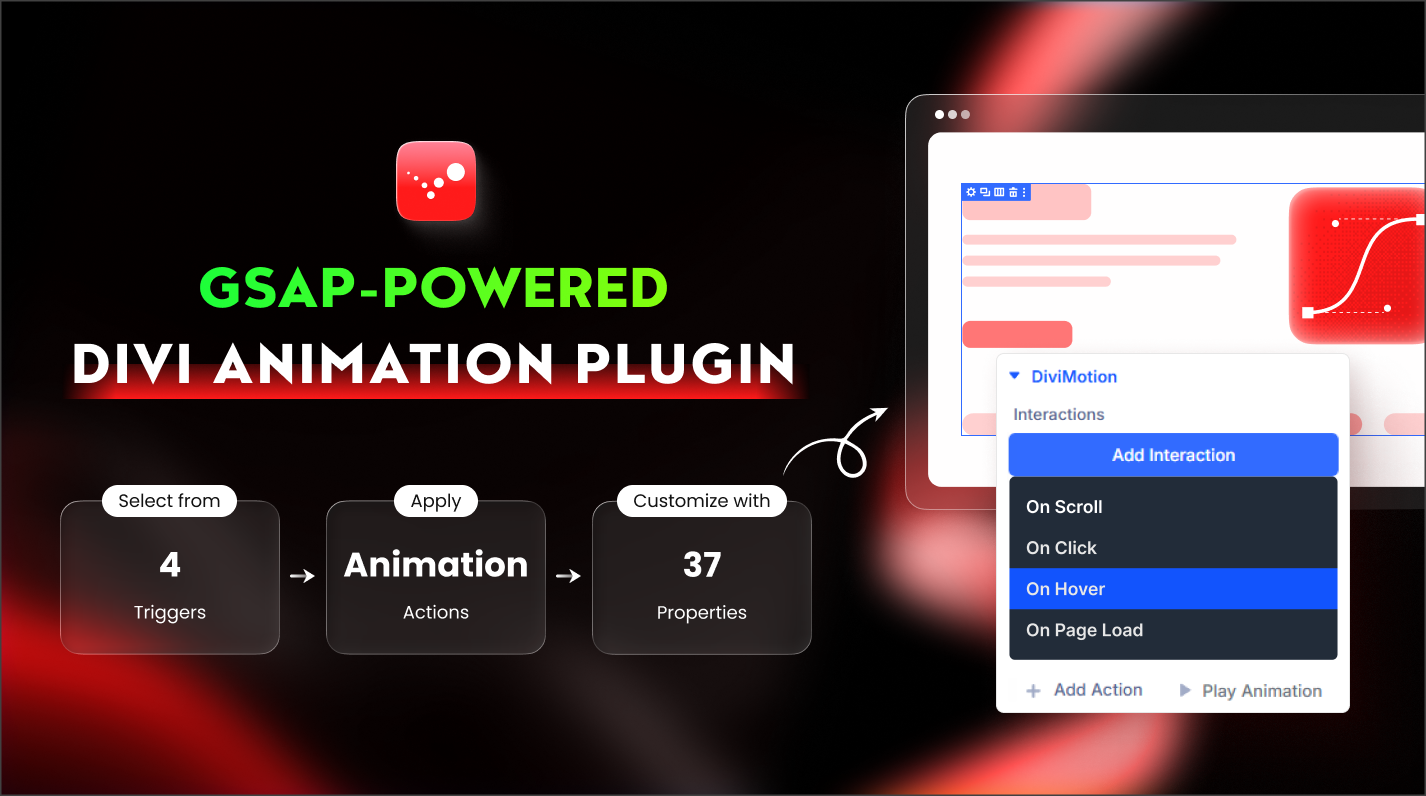
Most Divi websites look flat. DiviMotion changes that by bringing GSAP-powered scroll effects, hover interactions, click triggers, and timeline animations directly into the Divi Builder using a fully Divi-native interface—no code, no complexity, no performance bloat.
Animations That Respond to Scroll, Click, Hover, and Load
DiviMotion gives you full control over how your Divi content animates based on user behavior and page events. Choose the trigger, define the motion, and let DiviMotion handle the rest.

Scroll Animations
Animate content as users scroll through your page. Trigger animations when elements enter the viewport, scrub animations with scroll, pin sections, or reveal content progressively.
Click Animations
Start animations when users click buttons, icons, or any element. Reveal hidden content, toggle animations, or animate one element from another.

Hover Animations
Trigger animations when users hover over elements. Highlight cards, animate icons, reveal content, or create subtle micro-interactions that make your UI feel alive.

Page Load Animations
Animate elements as soon as the page loads. Perfect for hero sections, headlines, and first-impression moments that set the tone for your entire site.
Animate Anything — That's Right, Anything
These demos showcase how DiviMotion combines scroll, hover, click, and load triggers with GSAP-powered controls to create complex, high-impact animation.

Split Text Animations
Animate text by characters, words, or lines for cinematic headlines and hero sections. Perfect for staggered text reveals, masked transitions, and motion typography effects.

Stagger Animations
Animate multiple elements in sequence with precise control over delay, order, and easing. Ideal for cards, lists, grids, and repeating UI patterns.

Vertical Scroll Animations
Create classic and advanced vertical scroll effects where content animates as users move down the page. Control when animations start, end, and respond to scroll progress.

Horizontal Scroll Animations
Build horizontal scrolling sections controlled by vertical scroll. Perfect for feature showcases, portfolios, and immersive storytelling layouts.

Pinned Scroll Animations
Pin sections or elements during scroll to keep them fixed while animations play. Commonly used for step-based storytelling, feature walkthroughs, and long-form pages.

Scroll Stack Animations
Layer multiple sections or elements and animate them sequentially as users scroll. Create stacked transitions, overlapping motion, and depth-driven layouts.
Create Powerful Animations in Just 3 Steps
You define when an animation runs, what happens, and how it moves — that's it.
Add an Interaction
Start by adding an interaction to any section, row, or column. The interaction defines when the animation should trigger — on scroll, hover, click, or page load.
Step 01
Add an Action
Inside each interaction, add one or more actions. Actions define what happens — such as fading in, moving, scaling, rotating, or sequencing animations over time.
Step 02
Add Properties
Choose the properties you want to animate — position, opacity, scale, rotation, color, and more. Set FROM and TO values to control exactly how elements animate.
Step 03
Save Flat 60% OFF for DiviGear Users Only Exclusively!
Choose the plan that fits your need; every plan gives you full access to all DiviMotion features without limits.
Professional
For Freelancers & Agencies
$249.00
$99.60/One-Time
No renewals – lifetime access.
- Use on Unlimited Websites
- Lifetime Updates & Priority Support
- Divi 5 Ready
- All Features Included
- 30 Day Money-back Guarantee

Best Value
Personal
For Individuals & Solopreneurs
$149.00
$59.60/One-Time
No renewals – lifetime access
- Use on 1 Website
- Lifetime Updates & Priority Support
- Divi 5 Ready
- All Features Included
- 30 Day Money-back Guarantee
Professional
For Freelancers & Agencies
$79.00
$31.60/Year
Renews at $31.60 annually; cancel anytime.
- Use on Unlimited Websites
- 1-Year Updates & Priority Support
- Divi 5 Ready
- All Features Included
- 30 Day Money-back Guarantee
Best Value
Personal
For Individuals & Solopreneurs
$49.00
$19.60/Year
Renews at $19.60 annually; cancel anytime.
- Use on 1 Website
- 1-Year Updates & Priority Support
- Divi 5 Ready
- All Features Included
- 30 Day Money-back Guarantee
Frequently Asked Questions
Still have questions? Email us at support@divimotion.com or use the chat box in the bottom right corner.
Is DiviMotion compatible with Divi 5?
Yes. DiviMotion is built specifically for Divi 5 and its modern React-based architecture. It is not compatible with Divi 4 or earlier versions.
Do I need coding knowledge to use DiviMotion?
Not at all. DiviMotion is completely visual. You can create advanced animations without writing a single line of CSS, JavaScript, or using timeline code.
How is DiviMotion different from Divi’s built-in animations?
Divi’s default animations work well for basic entrance effects. DiviMotion goes much further—enabling scroll-based motion, click and hover interactions, timeline animations, and layered sequences using GSAP precision. It’s animation without limits, built directly into the Divi Builder.
Will using DiviMotion slow down my website?
No. DiviMotion is performance-optimized and loads only what’s needed. It’s built for smooth, efficient animations that don’t weigh down your site.
Can I use DiviMotion on client websites?
Yes. Depending on your license, you can use DiviMotion on one or unlimited websites—including client projects.
Is DiviMotion beginner-friendly?
Absolutely. You can start fast with ready-made presets and templates, then explore more advanced motion techniques as you go. If you can use Divi, you can use DiviMotion.
Do you offer a money-back guarantee?
Yes. We offer a 30-days, no-questions-asked refund policy. If DiviMotion doesn’t work for you, we’ll make it right.
Can I upgrade my license later?
Yes. You can upgrade from a single site to unlimited, or from a yearly to lifetime plan anytime—just pay the difference.


We offer a 30-day money-back guarantee; so joining is completely risk-free.
Don’t Just Design Divi Sites; Make Them Move
Unlimited Websites License
$249.00
$99.60/One-Time
No renewals – lifetime access.
Single Site License
$149.00
$59.60/One-Time
No renewals – lifetime access
Unlimited Websites License
$79.00
$31.60/Year
Renews at $31.60 annually; cancel anytime.
Single Site License
$49.00
$19.60/Year
Renews at $19.60 annually; cancel anytime.